





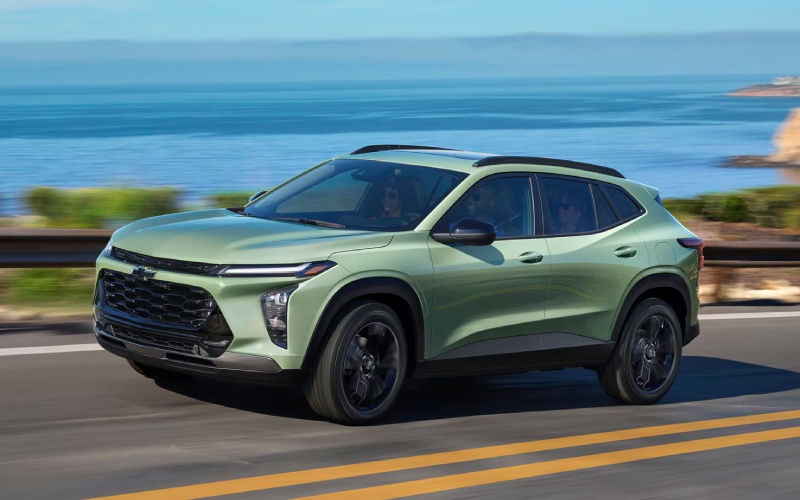
Jeff D’Ambrosio Chevrolet – 2026 Chevrolet Trax Screen and Smartphone Simplicity for White Marsh, MD Drivers
If your daily routine includes the weave of I-95, errands along Honeygo, and quick stops in bustling shopping centers, tech that just works can make the difference between a good drive and a great one. The 2026 Chevrolet Trax leans into simplicity where it matters most, with standard wireless Apple CarPlay® and wireless Android Auto™ that streamline the minute-to-minute reality of modern driving. No cable hunting. No awkward phone docks. Just a clean cabin, an easy connection, and your favorite apps front and center.
For drivers who want a richer visual experience, the available 11-inch center HD touch-screen unlocks a crisp, intuitive interface. It’s the right size for quick glances without dominating the dash, and it pairs naturally with voice controls when you want to keep your hands on the wheel as traffic ebbs and flows toward White Marsh, MD. Below, we dig into how the Trax turns your phone into a smarter co-pilot and why the system feels as straightforward on day 100 as it does on day one.
Wireless Integration That Feels Effortless
Standard wireless Apple CarPlay® and wireless Android Auto™ are more than convenience checkboxes—they’re pillars of a clutter-free daily drive. Once you pair your device, the Trax reconnects automatically, so navigation, podcasts, and calls are ready the moment you fire up the ECOTEC® 1.2L Turbo engine. Fewer steps mean fewer distractions, which matters when you’re easing through parking lots or merging onto the expressway.
Because the Trax structures its menus logically, switching between apps—maps, music, and messages—feels intuitive. At a glance, you can see what’s playing, what’s next, and where you’re headed without digging through layers of menus. It’s an interface designed to be seen quickly and acted on even more quickly.
Why the Available 11-Inch Display Hits the Sweet Spot
Screen size is about more than inches—it’s about information density and readability. The 11-inch center HD touch-screen strikes that balance, offering a wide canvas for split views, clearer icons, and crisp maps that help you anticipate lane moves near major shopping corridors. The pixel density and contrast make turn-by-turn prompts easier to parse at a glance, while generous on-screen buttons reduce mistaps when your hand is moving to and from the wheel.
The layout complements the 8-inch color Driver Information Center on select trims, giving you the ability to reserve key alerts, calls, or song info in the driver cluster while your main screen stays map-forward. That coordination lowers mental load when traffic picks up around interchanges or when you’re threading through neighborhood streets.
Keeping the Cabin Clear and Your Flow Uninterrupted
A wireless cabin isn’t just tidy—it’s more ergonomic. Without cords draped across consoles, cupholders stay free, and there’s less chance of snagging cables when you’re adjusting climate controls or storing your bag. The available wireless charging pad keeps compatible devices powered during longer stretches, while a built-in Wi-Fi® hotspot (available) helps passengers stream or catch up on work with less tethering hassle.
And because CarPlay® and Android Auto™ render on the vehicle display, your focus stays higher in your line of sight. That’s a subtle but real benefit you feel after a week of quick-shift commutes, where seconds and sightlines matter.
Voice, Touch, and Steering Controls Working Together
Great infotainment blends multiple inputs so you can use what’s safest in the moment. The Trax lets you tap, swipe, or speak your way through routine tasks. Calling a colleague, queuing a playlist, or rerouting around a slowdown becomes second nature with voice prompts. When you do need to touch the screen, the interface uses familiar gestures and consistent button placement to minimize learning curves.
Steering wheel controls help with volume, track selection, and call handling, so you’re not fishing across the cabin when the road surface gets busy or you’re working through a roundabout. All of it comes together to make short trips feel composed and longer drives feel less tiring.
Safety Tech That Complements Your Screen Time
Standard Chevy Safety Assist supports your awareness while you’re using navigation and communication features. Forward Collision Alert and Automatic Emergency Braking, Front Pedestrian Braking, Lane Keep Assist with Lane Departure Warning, Following Distance Indicator, and IntelliBeam® High Beam Assist are always on the job. When you glance at the screen, these systems work in the background to help you maintain the right following distance, stay centered, and keep an extra eye out in busy parking areas.
Because the safety suite is standard, you don’t need to hunt through complex packages to get core protections. Pair that with the clarity of the 11-inch display, and you’ve got a cockpit tuned for calm decision-making.
Trim Personalities: ACTIV and 2RS
Tech is table stakes, but style matters too. ACTIV brings Titanium chrome exterior accents, blackout wheels, and striking Yellow interior touches for an assertive, outdoorsy vibe. If you prefer a sportier edge, 2RS layers on Red interior accents, a race-inspired flat-bottom steering wheel, and bold Black exterior details. In both cases, the infotainment experience is the same—fast, wireless, and friendly—so you can choose the look you love without sacrificing daily usability.
Day-One Tips for a Smoother Setup
- Pair once: Connect your iPhone or Android on day one so the Trax auto-reconnects every drive.
- Set favorites: Pin your go-to apps and map views to reduce taps when you’re on the move.
- Use voice: Get comfortable with voice prompts for calls, messages, and quick reroutes.
- Keep charged: Place compatible devices on the available wireless charging pad to avoid low-battery surprises.
- Split duties: Let passengers handle playlists while you keep the main screen map-focused.
Everyday Ease You Can Feel
What stands out after a week with the Trax is how quickly the system becomes invisible—in the best way. You don’t think about how to connect, you just connect. You don’t wrestle with menus, you just go where you need to go. The combination of a thoughtfully sized display, clean wireless integration, and standard safety systems reduces friction and helps you arrive a bit more relaxed.
If you want a small SUV that gives you the essentials without overcomplication, this is the formula. It’s the same logic that makes the cargo area so useful, the seating so approachable for five, and the drive feel confident yet easygoing.
Where to See It Up Close
Ready to test how your favorite apps look on the Trax’s available 11-inch screen? Stop by to connect your phone, load your top routes, and see how the interface fits your daily rhythm. You’ll understand right away why so many drivers prioritize wireless integration when picking their next SUV.
Jeff D’Ambrosio Chevrolet is proudly serving Lancaster, Bel Air, and White Marsh with a team that can help you compare trims, set up your tech, and decide whether leasing or financing matches your driving habits. Bring your device, bring your questions, and prepare to check off the tech box with confidence—because when your infotainment just works, everything else falls into place.
Request more 2026 Chevrolet Trax information
Connect with us


